
Your transaction was successful. We truly appreciate your support!
To ensure that your order details are updated correctly, please refresh the add-on inside Gmail.
📌 How to update the addon:
- Open the Recurring – Out of office add-on in Gmail.
- Click the Refresh button, as shown in the image below.
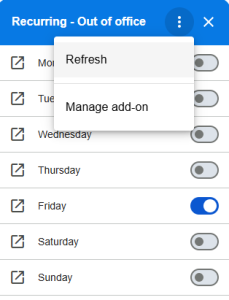
- Wait a few seconds for the latest data to sync.
⭐ Leave a review!
If you enjoyed your experience, please consider leaving us a review.

If you have any questions, feel free to reach out.
Thank you again! 🙌